Dash-AI-Tools/doc-my-repos
No description
Synced31 documentsLast synced Last run: scheduled sync, , no changes
READMEREADME.md

One searchable home for the documentation scattered across all your GitHub repositories.
Point DocMyRepos at your GitHub organization and every repository's docs/ folder becomes a fast, good-looking, searchable portal. No docs site to build, no pipeline per repo, and your Markdown stays where it lives.












DocMyRepos syncs the docs/ folder of each repository you choose from your GitHub organization into Postgres, gives every repository its own space, and gives the whole organization one search box. It works with plain Markdown and has first-class support for Open Knowledge Format (OKF).
Contents
- Features
- Screenshots
- How it works
- Quickstart
- Configuration
- Self-hosting
- Operations
- API reference
- Comments
- Ask the docs
- AI agent access
- Reading aids
- Security
- Development
- Project status and roadmap
- Contributing, conduct and license
Features
- Public access (optional): an admin can make chosen repositories, or whole folders of repositories, readable without signing in, with anonymous search and Ask as separate switches. Off by default: nothing is public until an admin marks it (see Public access).
- Folders and starred repositories: admins group repositories into named folders shown as sections on the home page, and star the ones to feature first, in an order they set. Both are optional; without them nothing changes.
- Reading aids: a text size slider, a distraction-free read mode and the theme switch live in one reading options button (see Reading aids).
- Per-repository space: the main README, the code owners from
CODEOWNERS, and a tree of the docs folder. - Good-looking Markdown: GitHub-flavored Markdown, syntax highlighting with Shiki, and Mermaid diagrams. Documents are untrusted: output is sanitized and
.mdxis never executed. - Search: full-text search across every synced repository (Postgres full-text search, weighted by title, headings, description and body), with highlighted snippets, facets and a
Ctrl/Cmd+Kpalette. - OKF aware: when a repository uses OKF, filter by concept
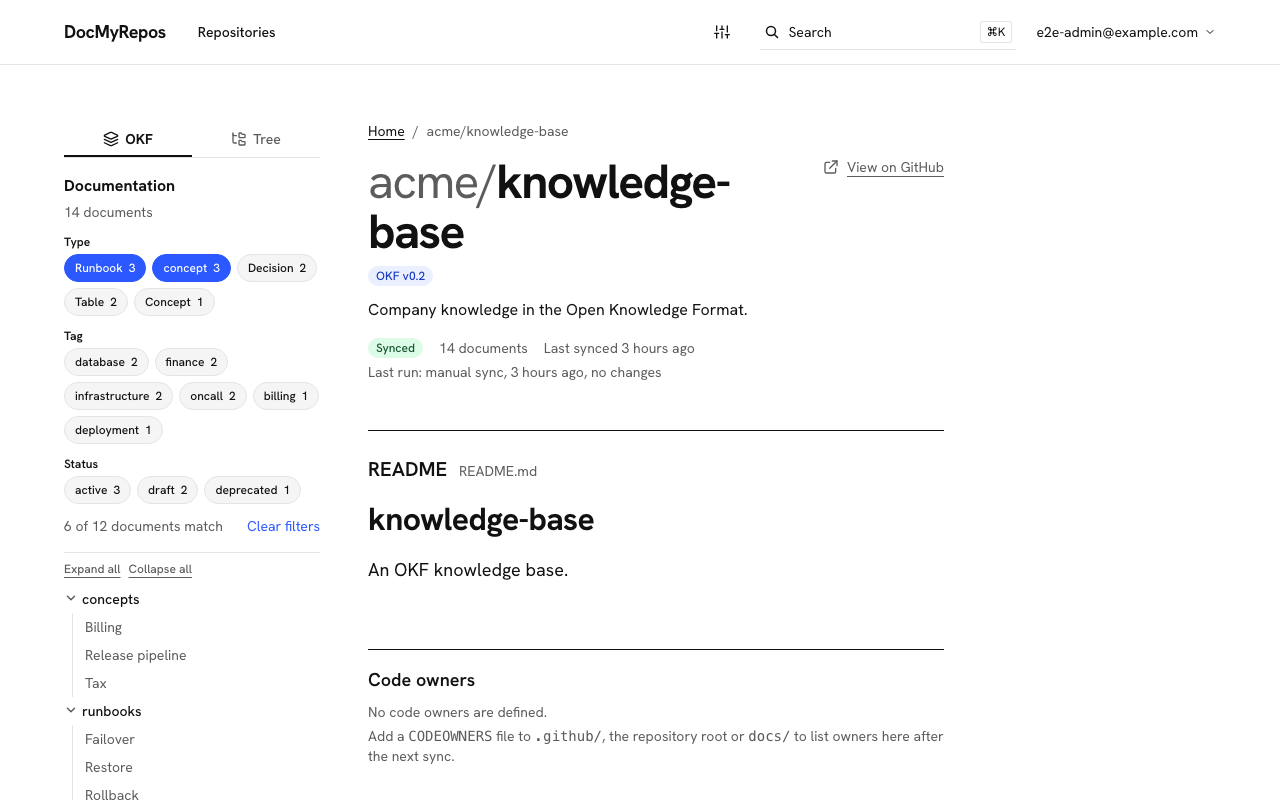
type(plus tags and status) and see each document's metadata, notices and change log. A switch at the top of the docs column toggles between this OKF view and a Tree view that mirrors the repository's folders and file names. Other repositories show no OKF interface. - API reference: OpenAPI 3.0/3.1 and Swagger 2.0 files are found in each repository and shown on a read-only reference page (see API reference).
- Comments: signed-in users discuss a document on its page, admins can answer as the organization and moderate. Comments are stored in the portal, not in GitHub (see Comments).
- Ask the docs: an optional assistant answers questions in plain language from the synced documents, with references to the exact sections. Off until an admin sets it up; the operator brings the model (see Ask the docs).
- AI agent access: AI agents (Claude Code, Cursor) read the docs through a read-only MCP endpoint with a personal token that a user creates, shows once and can revoke (see AI agent access).
- Your branding: admins set the organization name, page title, colors and logo from
/admin/branding(see Branding). - Light and dark themes: light, dark, or follow the system, including code blocks and diagrams, without a flash on load.
- Fresh content: GitHub webhooks re-sync a repository when its default branch changes, and a scheduled full sync catches missed deliveries. Syncs are incremental (tree SHA, then blob SHA), idempotent and serialized per repository; a failed sync keeps the previous content.
- Extensible: the app is built from the published packages
@docmyrepos/core,@docmyrepos/serverand@docmyrepos/ui, so another application can add hooks, adapters and plugins without forking (see the extension API). - Self-hostable: one Next.js app plus Postgres, with a Docker image and Compose file. Behind a login with admin and user roles (see Security).
Screenshots
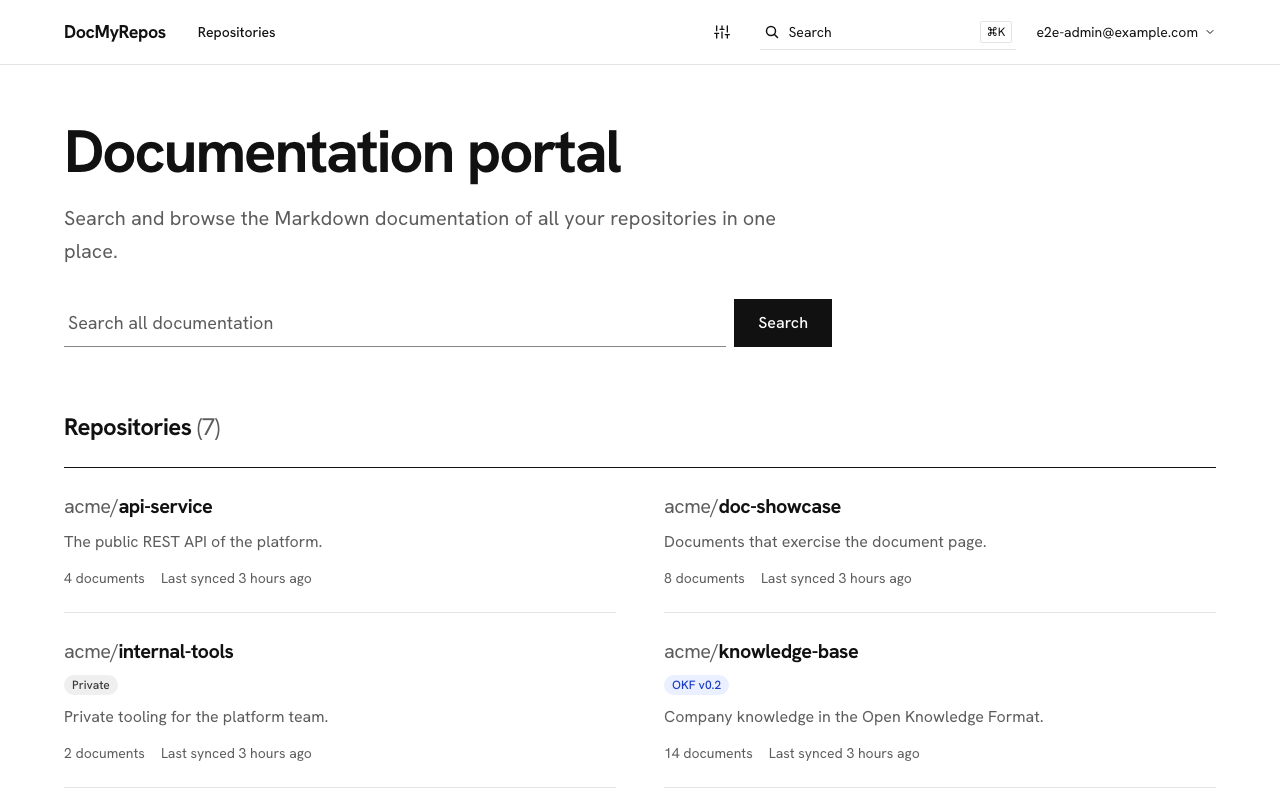
Each image has a light and a dark version; GitHub shows the one that matches your theme. They were captured from a running instance synced from a real GitHub organization, with the portal branded from /admin/branding (purple top bar and logo). The documents shown belong to a fictitious restaurant called Fork & Flame and to this repository.
A repository: README, filters and documentation tree
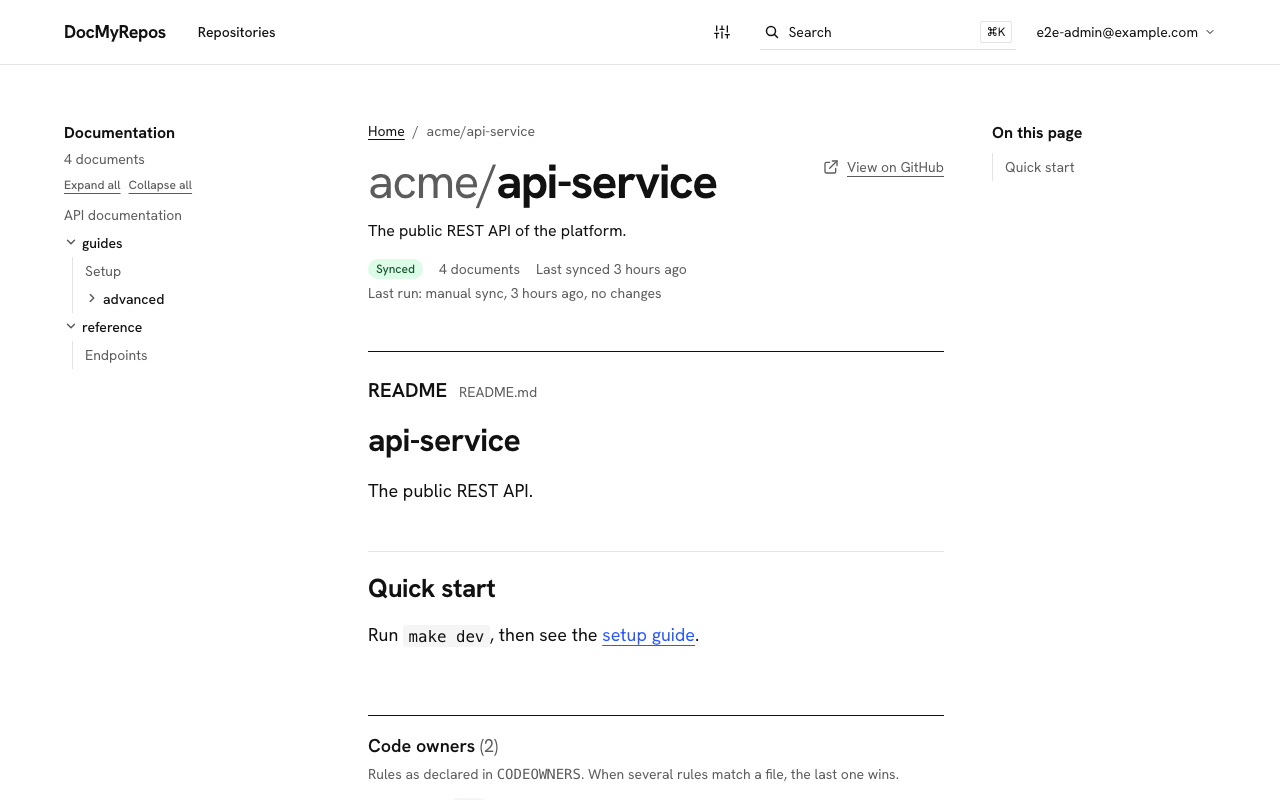
A document with metadata, a Mermaid diagram and comments
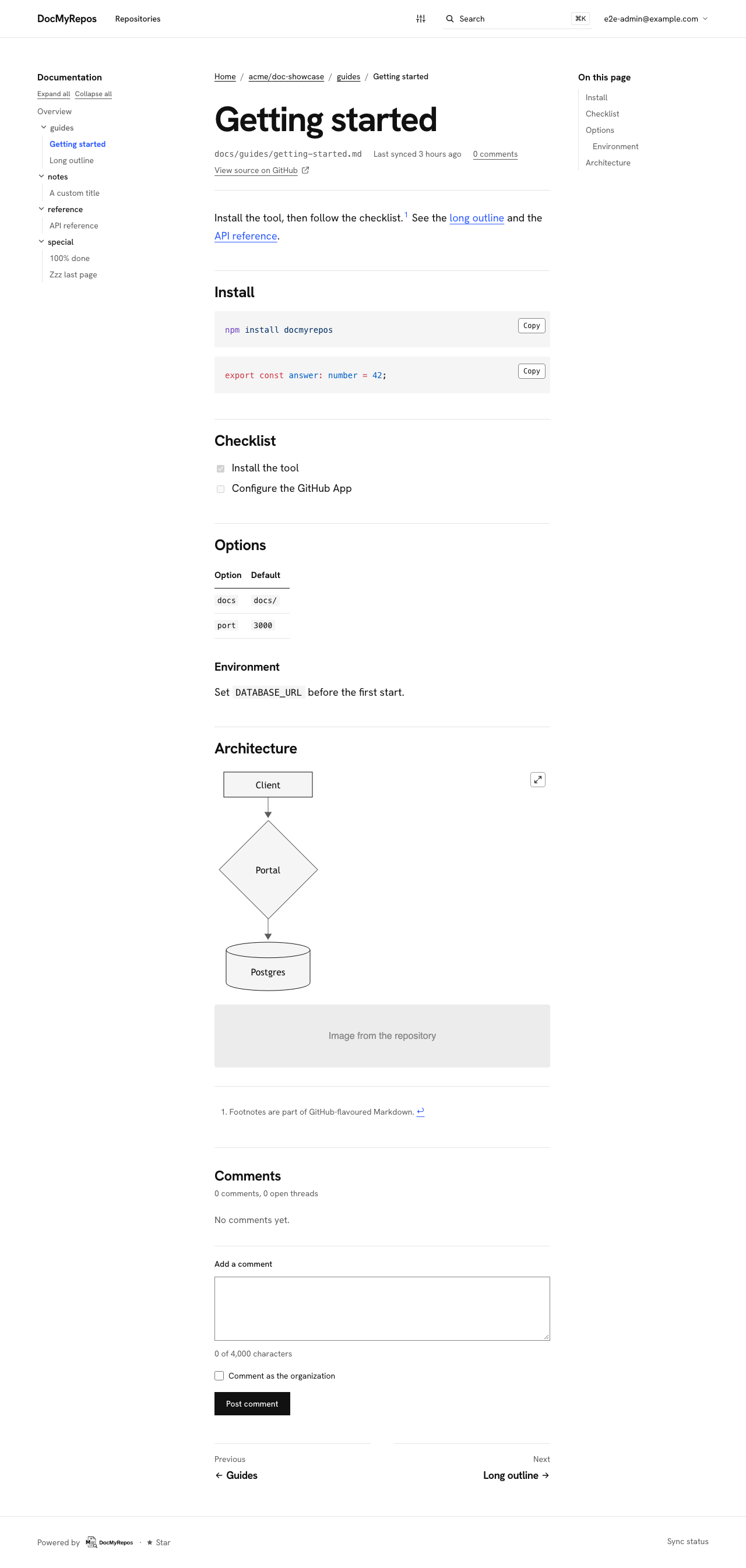
Search across all repositories
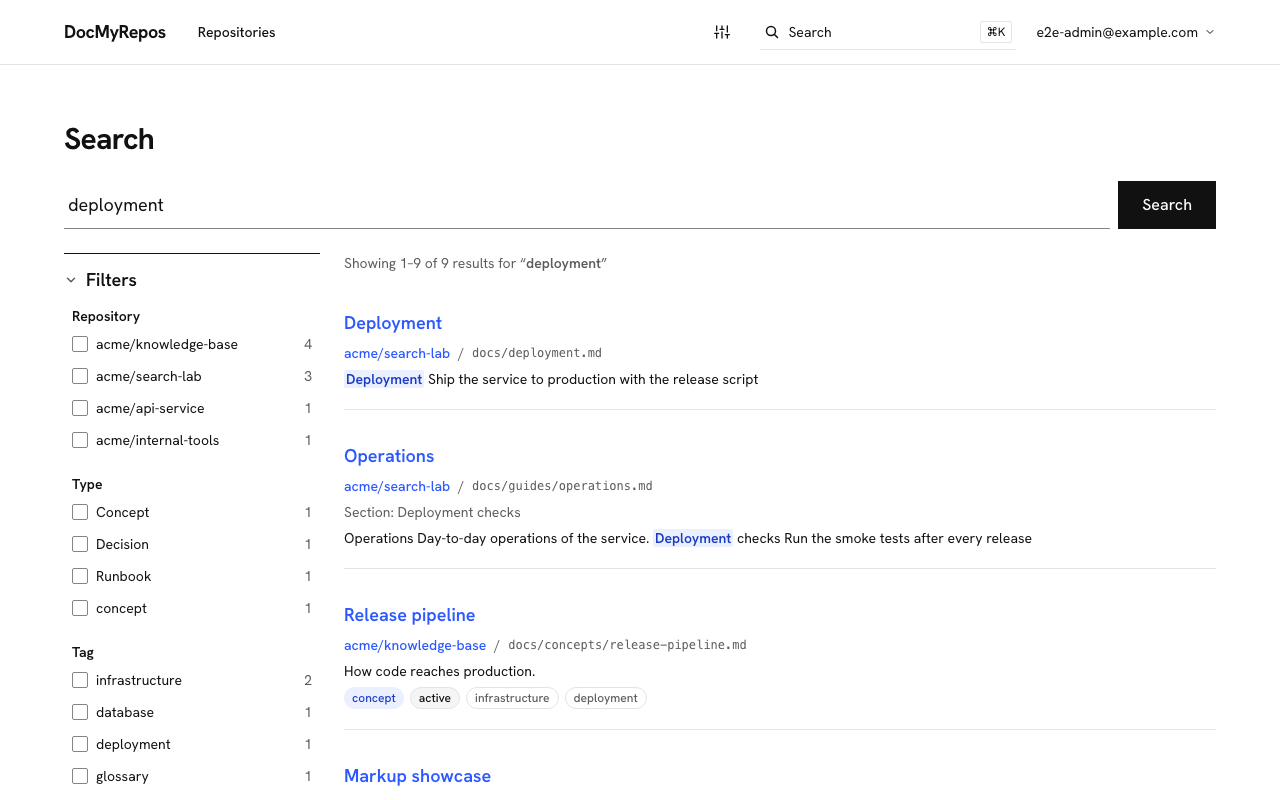
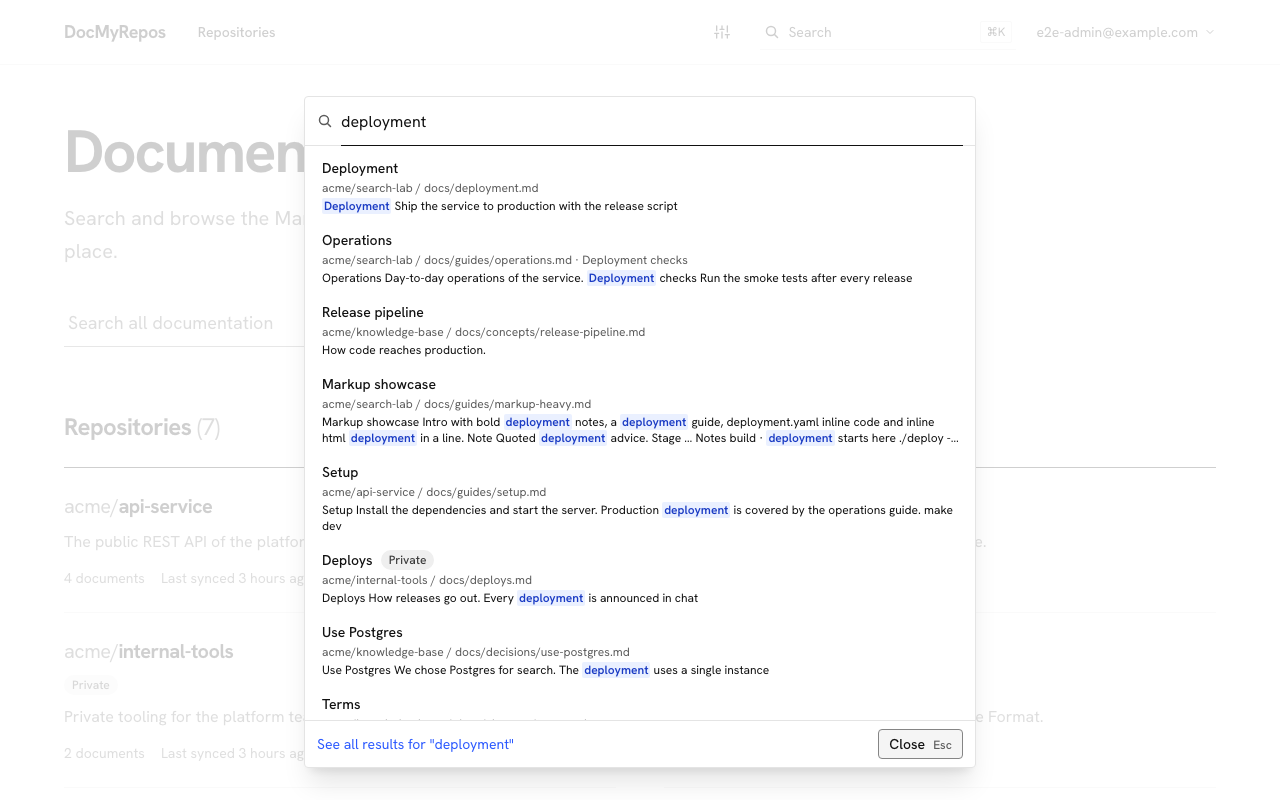
The command palette (Ctrl/Cmd+K)
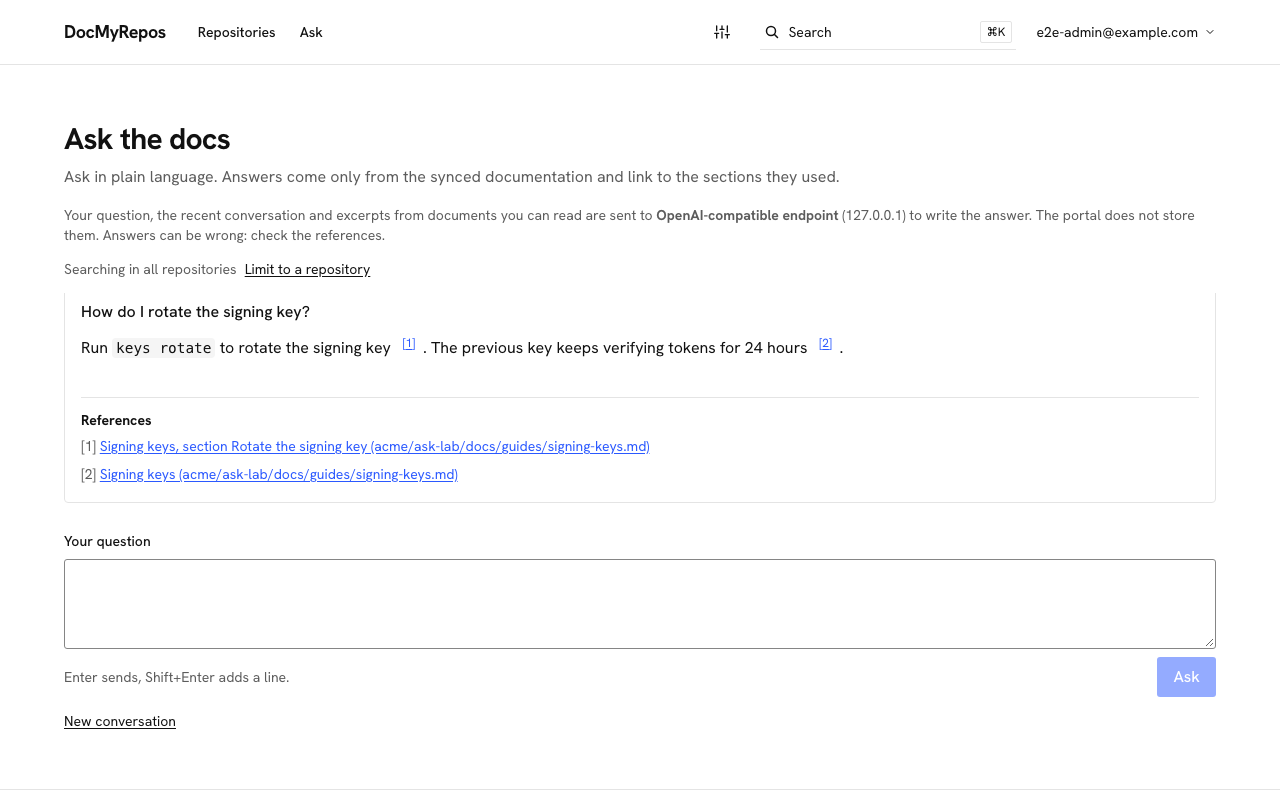
Ask the docs
OKF: filter by type, tag and status
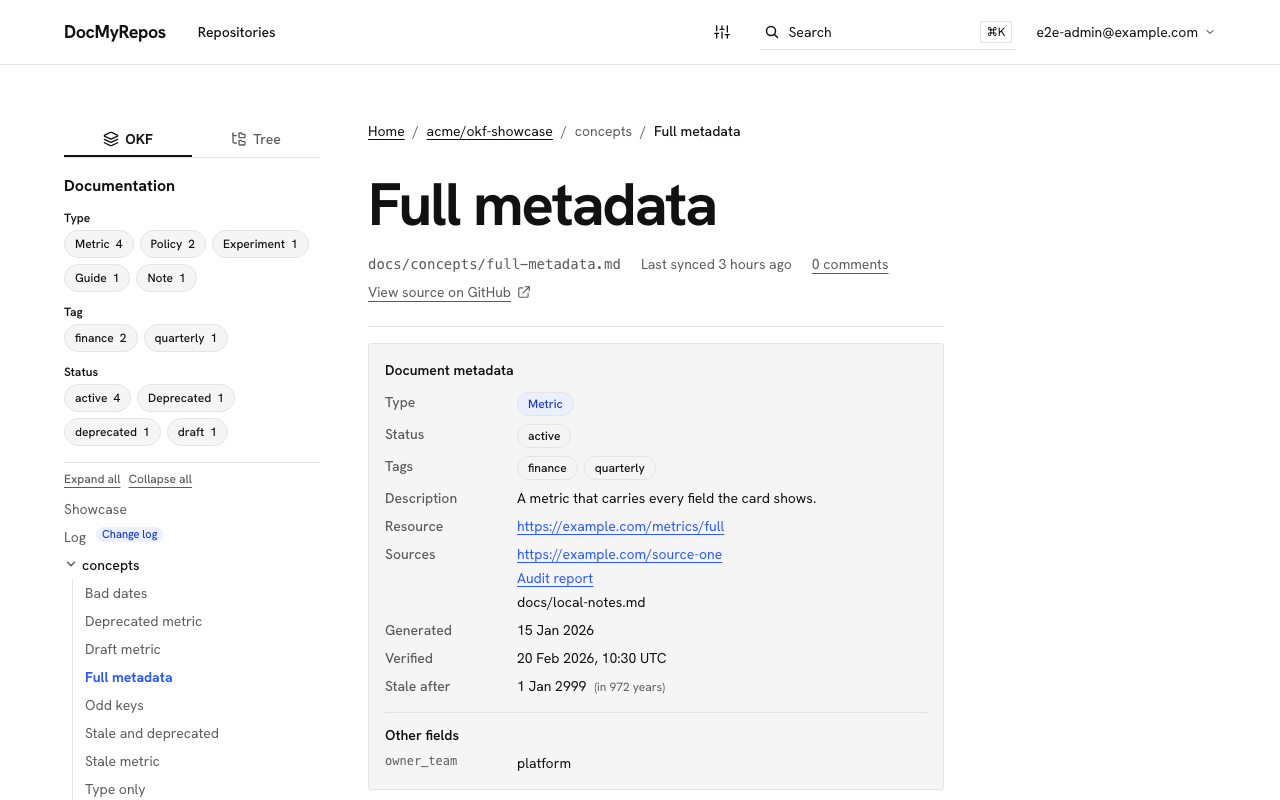
OKF: the metadata of a document
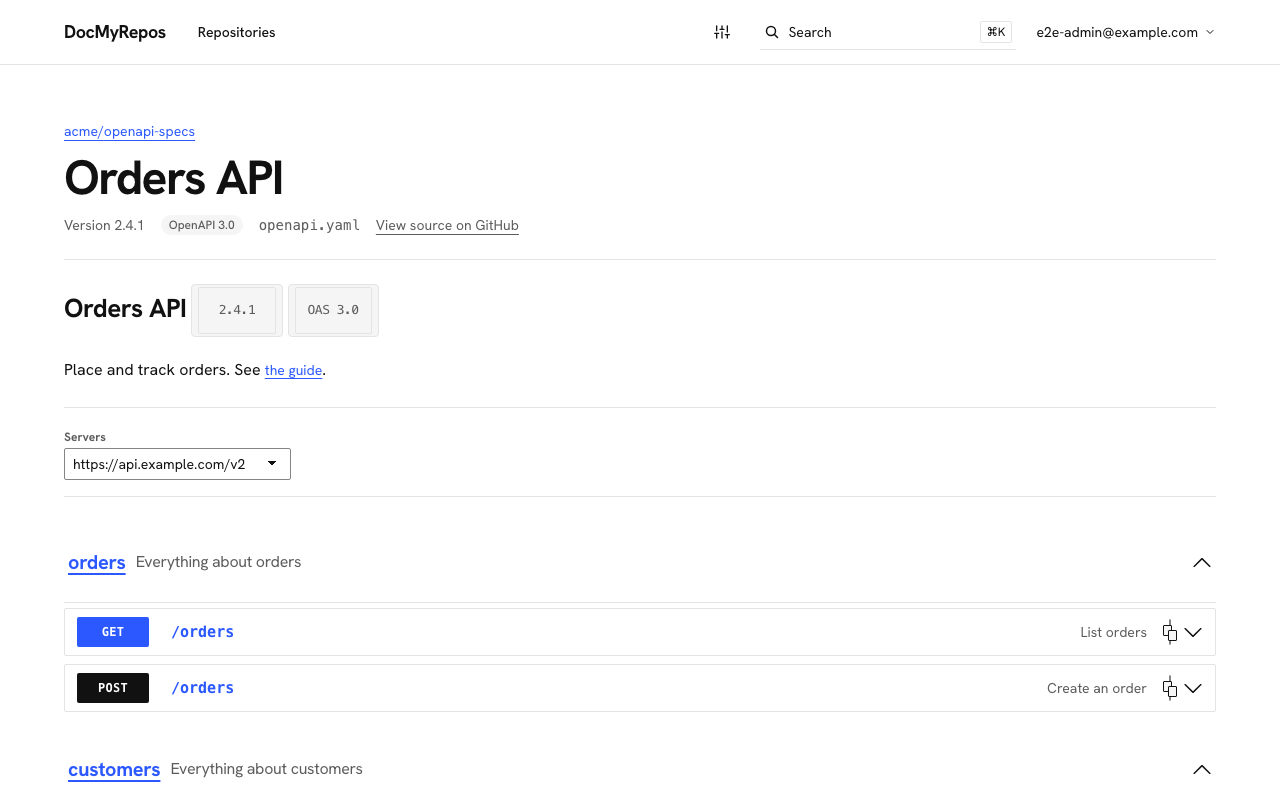
API reference from an OpenAPI file
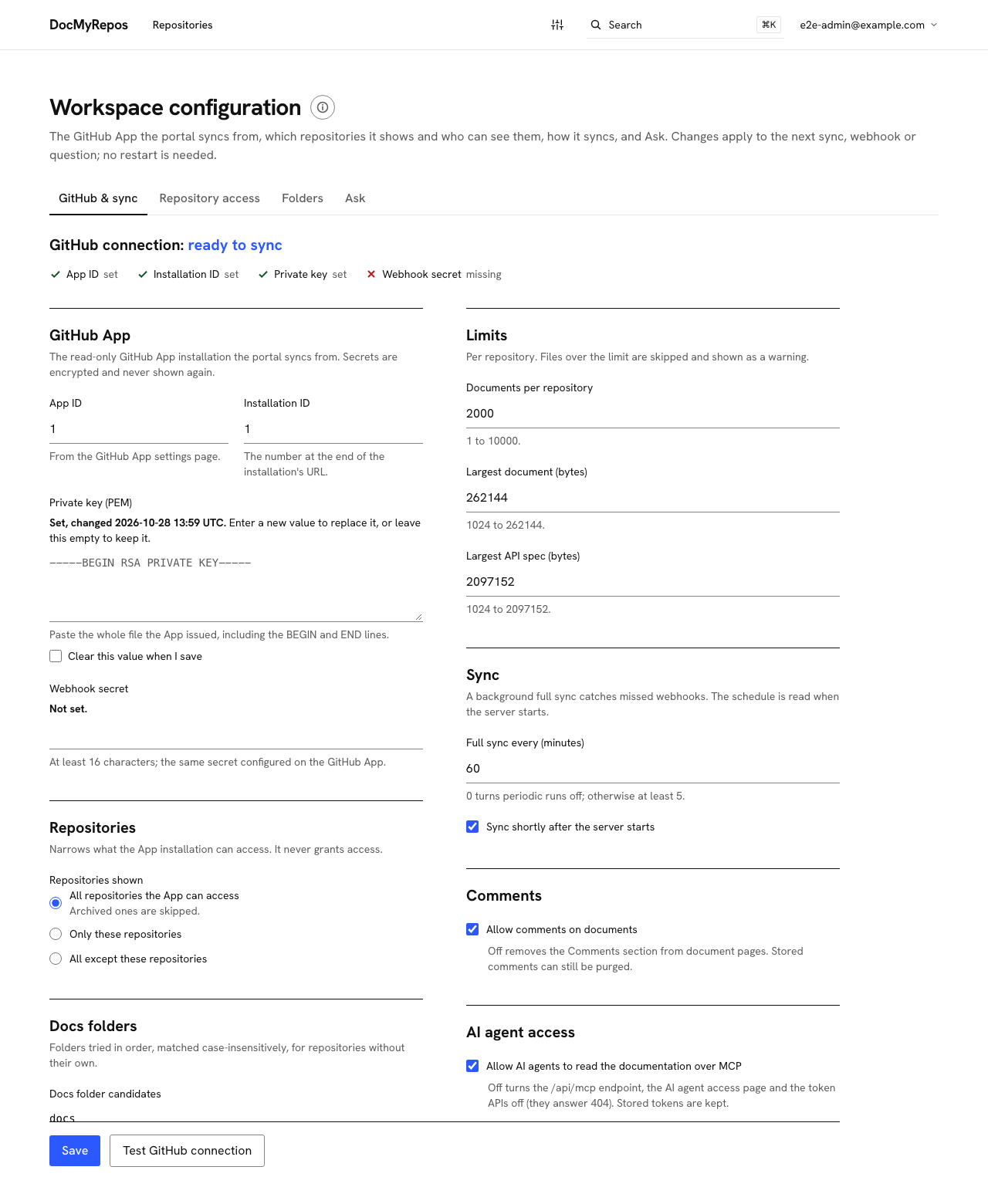
Admin: workspace configuration
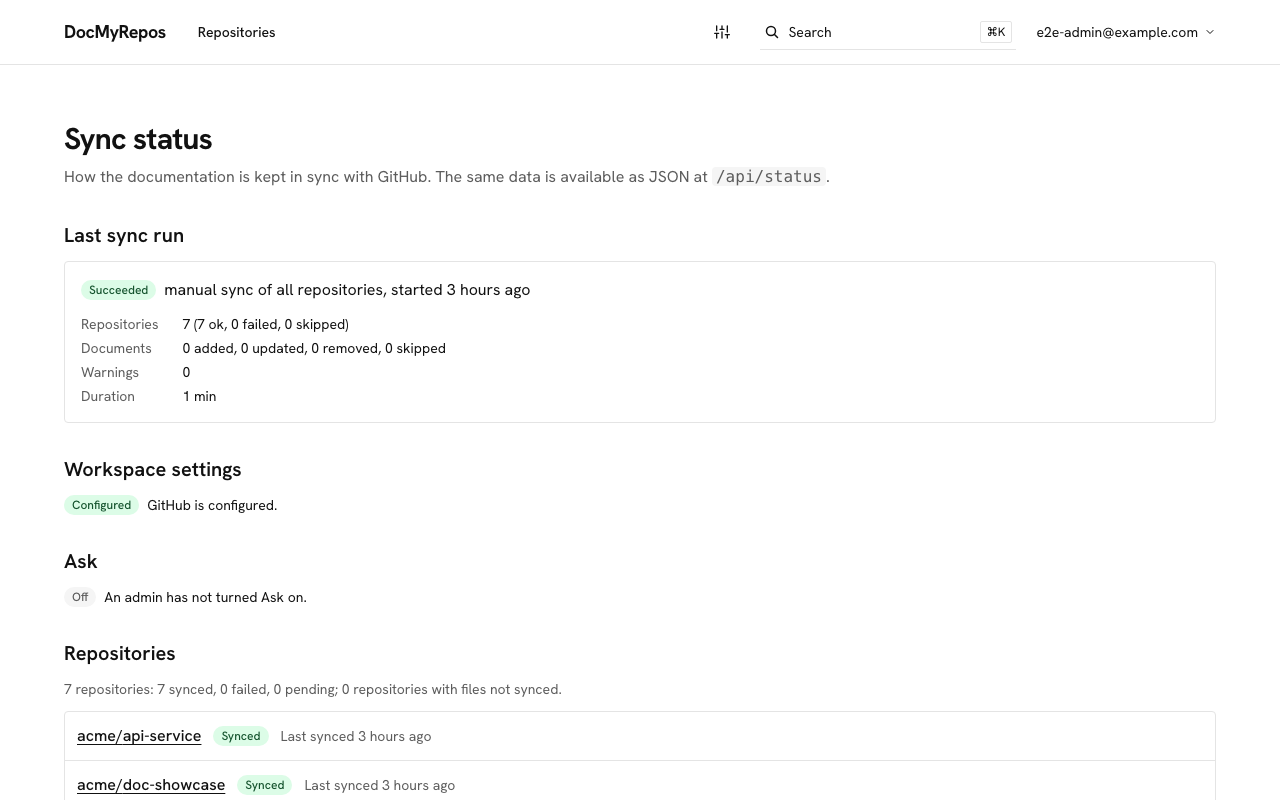
Sync status
How it works
flowchart LR
  GH[GitHub org] -- push webhook --> API[Next.js app]
  App[GitHub App installation] --> Sync
  Cfg[Settings in Postgres] --> Sync
  API --> Sync[Sync engine]
  Sched[Scheduler] --> Sync
  Sync -- tree / blobs / CODEOWNERS --> GH
  Sync --> DB[(Postgres)]
  DB --> UI[Repo pages + search]
The app authenticates as a GitHub App installation (read-only, never a personal access token), discovers the repositories the installation can access, narrows them by the repository settings an admin chose, and stores parsed documents (Markdown body, frontmatter, headings, title, type, tags, status) in Postgres. Pages and search read Postgres only: GitHub is never called while you browse, except the image proxy /api/asset, which fetches repository images on demand. HTML is rendered at read time and sanitized after all transforms.
| Route | What it serves |
|---|---|
/ | Repository grid and search box |
/<owner>/<repo>, .../docs/<path> | Repository space and documents |
/search, GET /api/search | Search page and JSON search for the palette |
/status, GET /api/status | Sync status page and JSON (needs a login) |
GET /api/health | Health check (no login, verdict only) |
POST /api/webhooks/github | GitHub App webhook, verified against the raw body with the webhook secret |
POST /api/sync | Manual sync, guarded by SYNC_SECRET (Authorization: Bearer <secret>) |
GET /api/asset/<owner>/<repo>/<path> | Image proxy for documents; images only, path must be inside a synced repo |
Quickstart
You need a GitHub App first. Register and install it by following the GitHub App setup guide (read-only Contents and Metadata, four events, a webhook URL and secret). You end with the App id, a private key and the installation id, which you enter in the app after the first sign-in. There is also an App manifest.
With the install script (recommended)
Requires Linux, macOS or WSL, curl, and Docker with Compose v2 running. The URL is the
install.sh asset on the GitHub Release;
it pulls ghcr.io/dash-ai-tools/doc-my-repos:0.2.0.
curl -fsSL https://github.com/Dash-AI-Tools/doc-my-repos/releases/download/v0.2.0/install.sh | shThe script checks that Docker works, asks four questions in the terminal (install folder, port, first admin's email and password), generates every secret, writes a hardened docker-compose.yml and an owner-only .env, pulls the published image, starts the app and Postgres, and waits until the app is healthy. It never overwrites an existing installation and sends nothing anywhere except the image pull. Then:
- Open the address it prints and sign in as the administrator.
- Go to Admin > Workspace configuration and enter your GitHub App (see the setup guide).
- On Repository access, press Run first sync.
- Remove
ADMIN_EMAILandADMIN_PASSWORDfrom.envand rundocker compose up -d.
--dry-run shows the plan and writes nothing, --yes with flags and DOCMYREPOS_* variables runs it without questions (curl ... | sh -s -- --dry-run), and you can read the script before running it (curl -fsSLO <url> && less install.sh). Replace v0.2.0 with the release you want. To upgrade later, run the newer release's script with --upgrade --dir <folder>: it backs up the database, changes only the image in .env, restarts and waits for health. All flags, the files it writes and how to restore a backup are in the install script guide. Back up the generated .env with your database: it holds the key that decrypts your stored secrets.
If the image pull fails with unauthorized or not found, the GHCR package may still be private: a
maintainer must set Package settings → Change visibility → Public on
ghcr.io/dash-ai-tools/doc-my-repos after the first publish.
With Docker Compose
Requires Docker with Compose. Use this path when you have a clone of the repository.
Build from source (default for development and for trying unreleased commits):
git clone https://github.com/Dash-AI-Tools/doc-my-repos.git
cd doc-my-repos
cp .env.example .env
# edit .env: set SETTINGS_ENCRYPTION_KEY (openssl rand -base64 32), SYNC_SECRET and
# SESSION_SECRET, plus ADMIN_EMAIL and ADMIN_PASSWORD for the first admin login
docker compose up -d --build --wait    # builds the app, starts Postgres 17; migrations run on start
Use the published image (no local build; same .env as above):
git clone https://github.com/Dash-AI-Tools/doc-my-repos.git
cd doc-my-repos
cp .env.example .env   # set the same secrets as above
docker compose pull app && docker compose up -d --wait
docker-compose.yml defaults to ghcr.io/dash-ai-tools/doc-my-repos:0.2.0. Override with
DOCMYREPOS_IMAGE (see .env.example). --build always rebuilds from the checkout and tags the
result with that image name.
Open http://127.0.0.1:3000. The portal is behind a login: sign in with ADMIN_EMAIL and ADMIN_PASSWORD, which create the first admin the first time you log in while no users exist (then remove both from .env). Next, you are taken to Admin > Workspace configuration, where a pop-up lists the steps:
- On the GitHub & sync tab, enter the GitHub App ID, installation ID, private key and webhook secret, press Save and use Test GitHub connection. The connection summary shows a check mark for every value that is set.
- On the Repository access tab, choose which repositories are shown (all, only a list, or all except a list) and which of them signed-in users can see, then press Run first sync. The background scheduler is on in the image, but its startup sync runs before you have entered the settings, so this button is what fills the portal the first time. Progress and errors are on
/status. - Optionally, turn on Ask the docs on the Ask tab and set the portal's name, colors and logo under Admin > Branding. Admins also add users under Admin > Users.
To start a sync from a script or cron job instead, call the manual sync endpoint:
curl -X POST -H "Authorization: Bearer <SYNC_SECRET from .env>" http://127.0.0.1:3000/api/syncSETTINGS_ENCRYPTION_KEY in .env.example is blank on purpose. Without it the server still starts and serves, but secrets cannot be saved or read until you set one (the container log names it: docker compose logs app, event config.encryption_key_invalid). Back this key up with your database backups. Until GitHub is configured at /admin/workspace, the home page says nothing is synced yet and /status lists what is missing. To narrow the repositories, see Configuration.
On your machine (development)
Requires Node.js 24, pnpm 11.25 (corepack enable && corepack prepare pnpm@11.25.0 --activate) and Docker (for Postgres).
git clone https://github.com/Dash-AI-Tools/doc-my-repos.git
cd doc-my-repos
pnpm install
cp .env.example .env     # set SETTINGS_ENCRYPTION_KEY, SYNC_SECRET, SESSION_SECRET; DATABASE_URL already matches `pnpm db:up`
pnpm db:up               # Postgres 17 on 127.0.0.1:5432 (docker compose, db service only)
pnpm db:migrate          # applies the SQL migrations in drizzle/
pnpm dev                 # http://localhost:3000
The background scheduler is off in development, so pnpm dev never calls GitHub on its own. Start the first sync with Run first sync on the Repository access tab, or with the curl command above (against http://localhost:3000). GitHub can only deliver webhooks to a public URL; use a tunnel such as smee.io or ngrok (see the setup guide). Until an admin enters the GitHub App at /admin/workspace, the app still starts and serves, the home page says nothing is synced yet, and /status names what is missing.
Configuration
Behavior is configured in the app, by admins, and by a few environment variables. The GitHub App, the repositories shown, the limits, the sync schedule and the model provider are settings stored in the database, edited at Admin > Workspace configuration (/admin/workspace) and Admin > Ask (/admin/ask). Secrets among them (the App private key, the webhook secret, provider keys) are encrypted before they are stored with SETTINGS_ENCRYPTION_KEY, are write-only (the page shows only that a value is set and when it changed), and are never logged. A change applies to the next sync, webhook or question; other server instances see it within about 5 seconds. Each change is recorded with who made it and which fields changed, never the values.
Settings (admin pages)
| Setting | Default | Meaning |
|---|---|---|
| GitHub App: App ID, installation ID | none | Which App installation to sync from. Nothing is synced until these and the private key are set. |
| GitHub App: private key, webhook secret | none | Write-only secrets. The webhook secret (16+ characters) verifies webhook signatures; without one every delivery gets 401. |
| Repositories shown | all accessible repos | All, only a list, or all except a list. The App installation is always the upper bound. A list entry is a name, optionally with docsPath=folder or apiSpecs=path1,path2. |
| Docs folder candidates | docs, doc, documentation | Tried in order, matched case-insensitively. Relative paths without ... |
| Documents per repository | 2000 (1 to 10000) | More documents: only the first N in path order are synced and a warning is shown. |
| Largest document (bytes) | 262144 (1024 to 262144) | Larger files are skipped with a warning. 256 KB is also the maximum. |
| Largest API spec (bytes) | 2097152 (1024 to 2097152) | Larger spec files are skipped with a warning. See API reference. |
| Full sync every (minutes), sync on startup | 60, on | Period of the full sync that catches missed webhooks (0 turns it off, otherwise 5 to 10080). Read when the server starts: a change applies after a restart. |
| Allow comments | on | Off removes the Comments section and turns the comment APIs off. Stored comments are kept. See Comments. |
| AI agent access (MCP) | on | Off turns the /api/mcp endpoint, the AI agent access page and the token APIs off (they answer 404). Stored tokens are kept. See AI agent access. |
| Ask limits | 100/day, 20/10 min, 1000, 8 | Questions per user per day and per ten minutes, longest answer in tokens, answers at once per server process. See Ask the docs. |
| Ask provider credentials | none | Anthropic key; OpenAI-compatible base URL (https, or http on a loopback address) and key. On the Ask page. |
Files left out by the limits are listed as a warning in the repository header and on /status.
Public access
By default every page is behind the login. On the Repository access and Folders tabs of /admin/workspace an admin can turn Public on for a repository, or for a folder (every allowed repository in it). A visitor without a session then sees the home page with only the public repositories and folders, can read their repositories, documents, API reference and images, and gets a Sign in button in the header. Everything else (status, admin, comments, tokens, MCP) still needs a login, and a repository that is not public cannot be told from one that does not exist: both send the visitor to sign in. With nothing public, / redirects to the login as before.
- Blocking wins. A blocked repository is hidden from everyone, public or not. Signed-in users keep seeing every allowed repository.
- Private on GitHub. Making public a repository that is private on GitHub, or a folder that holds one, asks for a confirmation that says how many are affected, because their documents become readable by anyone.
- Search for anonymous visitors is on once something is public, and can be turned off. Ask for anonymous visitors is off by default and needs Ask itself turned on with a provider; every anonymous question is paid for by the portal, so the questions per day and per ten minutes are caps shared by all anonymous visitors. No question, answer or visitor address is stored.
See docs/guides/configuration.md.
Upgrading from the config file and environment variables
Earlier versions read docmyrepos.config.yml and the variables GITHUB_APP_ID, GITHUB_APP_INSTALLATION_ID, GITHUB_APP_PRIVATE_KEY, GITHUB_APP_PRIVATE_KEY_PATH, GITHUB_WEBHOOK_SECRET, AI_ANTHROPIC_API_KEY, AI_OPENAI_BASE_URL, AI_OPENAI_API_KEY and CONFIG_PATH. They are no longer read, and nothing is imported. After upgrading:
- Set
SETTINGS_ENCRYPTION_KEY(openssl rand -base64 32) and back it up with your database. - Sign in as an admin and enter the values at
/admin/workspace(the GitHub & sync and Ask tabs), copying the repository list and limits from your old file. Until then the portal keeps serving what is stored, sync, webhooks and the image proxy report "not configured", and Ask is off. - Remove the old variables and the file.
/statusand the server log name any that are still present (names only).
Environment variables
.env.example lists every variable with its comment. Real values go in .env (git-ignored) or the environment of your platform.
| Variable | Required | Purpose |
|---|---|---|
DATABASE_URL | yes | Postgres connection string (postgres:// or postgresql://). Compose points the app at its db service itself. |
SETTINGS_ENCRYPTION_KEY | yes | Encrypts the secrets stored in the database. Base64 text, 32+ bytes (openssl rand -base64 32). Back it up; changing or losing it makes stored secrets unreadable (enter them again). |
SYNC_SECRET | yes | Secret protecting POST /api/sync, 16+ characters. |
SESSION_SECRET | yes | Signs the login session cookie, 16+ characters. Not a placeholder. |
ADMIN_EMAIL, ADMIN_PASSWORD | no | Bootstrap admin, created on first login when no users exist. Password 12+ characters. |
LOG_LEVEL | no | debug, info (default), warn, error or silent. An unknown value stops startup. |
SYNC_SCHEDULER | no | 1 or 0 forces the background sync scheduler on or off. Default: on when NODE_ENV=production, off otherwise. |
SKIP_MIGRATIONS, DB_WAIT_SECONDS | no | Container only: skip the start-up migrations (1); how long to wait for the database (default 60). |
APP_BIND, APP_PORT, APP_DATABASE_URL | no | Compose only: published address and port, an external database. |
POSTGRES_USER, POSTGRES_PASSWORD, POSTGRES_DB, POSTGRES_PORT | no | Compose only: credentials and port of the db service. |
Change
POSTGRES_PASSWORDfor anything that is not local development.docker compose configprints your.envvalues (secrets included) after interpolation: do not paste its output into issues or chats. Thereplace-with-...placeholder forSYNC_SECRETin.env.exampleis rejected at startup until you replace it, and the webhook secret you save for the App may not be a placeholder either. |TEST_DATABASE_URL,SKIP_DB_TESTS,DATABASE_URL_E2E,E2E_SKIP_DB| no | Tests only, see Development. |
Never set E2E_FIXTURES: it turns the server into a database-less fixture server for the browser tests.
Self-hosting
The Dockerfile builds a small production image (multi-stage, Node 24 on Alpine, runs as the non-root node user) and docker-compose.yml runs it with Postgres 17. Released tags are published to ghcr.io/dash-ai-tools/doc-my-repos (multi-arch). The image holds no secrets and no config: the environment holds the few startup settings and everything else is stored in the database. For a bare image:
# published
docker pull ghcr.io/dash-ai-tools/doc-my-repos:0.2.0
docker run -d --init --name docmyrepos -p 127.0.0.1:3000:3000 --env-file .env \
  -e DATABASE_URL=postgres://user:password@db.example.com:5432/docmyrepos \
  ghcr.io/dash-ai-tools/doc-my-repos:0.2.0

# or build locally
docker build -t docmyrepos .
docker run -d --init --name docmyrepos -p 127.0.0.1:3000:3000 --env-file .env \
-e DATABASE_URL=postgres://user:password@db.example.com:5432/docmyrepos docmyrepos- Settings: the GitHub App, repositories, limits and provider keys are entered in the app and stored in the database, not mounted as files or passed as variables. Keep
SETTINGS_ENCRYPTION_KEYwith your database backups. - Start-up: the entrypoint waits up to
DB_WAIT_SECONDSfor the database, applies the migrations in/app/drizzleunder a Postgres advisory lock (several containers may start together; one migrates, the others wait), then starts the server. If the database stays unreachable or a migration fails, the container prints why (never the connection string) and exits with status 1. Migrations are forward-only. - Health: the image has a
HEALTHCHECKonGET /api/health(no login; 200: the app and its database answer; 503: they do not, or the configuration is invalid), with a 90 second start period. - Stopping:
docker stopsendsSIGTERM. The scheduler stops, a running sync is aborted, and Next.js exits with status 143 (128 + SIGTERM), which Docker treats as a normal stop. Run with--init(compose hasinit: true). - Hardening in compose: read-only root file system with a
tmpfsat/tmp, all capabilities dropped,no-new-privileges, a process limit, rotated logs (3 files of 10 MB). The app is published on127.0.0.1:3000and the database on127.0.0.1:5432for development; in production remove thedbports entry, and changeAPP_BINDonly if your reverse proxy runs on another host. - External database: set
APP_DATABASE_URL(percent-encode special characters in the password) and remove thedbservice and thedepends_onindocker-compose.yml. Connect directly to Postgres or through a pooler in session mode: the sync and migration locks are session-level advisory locks, which do not work through PgBouncer in transaction mode.
Reverse proxy
Put a reverse proxy (nginx, Caddy, Traefik, a cloud load balancer) in front. It must:
- Terminate TLS and forward
X-Forwarded-Protoby overwriting it with the scheme it received, never by appending to or trusting a client-supplied value. The app uses it to send HSTS only over HTTPS. - Not add security headers or a CSP. The app sets its own; a second copy may conflict.
- Not cache HTML. Pages are rendered per request with a nonce and send
Cache-Control: no-store. Only/_next/static/*is safe to cache. - Rate-limit
/api/search,/api/syncand/api/status. The app does not rate-limit; it only caps concurrent reads. - Pass the webhook body untouched to
/api/webhooks/github(the signature covers the raw body) and allow bodies of the size GitHub sends (up to 25 MB).
location / {
  proxy_pass http://127.0.0.1:3000;
  proxy_set_header Host $host;
  proxy_set_header X-Forwarded-Proto $scheme;   # overwrites any client value
  proxy_set_header X-Forwarded-For $remote_addr;
  client_max_body_size 25m;
}
The portal is behind a login. Only signed-in users can read documents, and admins choose which repositories are visible. Access is by role, not per repository: every signed-in user can read every visible repository, so make a private repository visible only if all your users may read it.
Operations
- Health and sync status:
/statusshows the last sync run and every repository's state, errors and warnings.GET /api/statusserves the same data as JSON (needs a login, never cached, no secrets; it shows what the pages show). For health checks useGET /api/health, which needs no login and returns only the verdict:200 {"status":"ok"}means the app and its database answer;503 {"error":"unavailable"}means they do not. A failed repository sync does not change the status code: readsummary.errororlastRun.statuson/api/status. - Scheduler: it runs the startup and periodic full syncs (with ±10 % jitter, retrying failures sooner with backoff up to 15 minutes) and, every minute, any per-repository syncs left waiting by busy repositories or a restart. With several instances only one runs a scheduled full sync at a time.
SYNC_SCHEDULER=0turns it off. - Logs: one JSON object per line,
debugandinfoon stdout,warnanderroron stderr (docker compose logs app). Event names are stable dotted names such assync.run.finished,webhook.receivedandsync.discovery.failed. KeepLOG_LEVELatinfoor above in production. Credentials, request bodies, error messages and stacks are never logged, and the logger redacts anything that looks like a secret. - Backups: documents and repositories are derived from GitHub, so a lost database is rebuilt by a full sync (the sync history is lost), but users, settings and comments are not and cannot be rebuilt. To keep them:
docker compose exec db pg_dump -U docmyrepos docmyrepos > backup.sql. - Upgrading: from a clone,
git pull && docker compose up -d --build. With the published image, setDOCMYREPOS_IMAGEto the new tag (or use the new release'sinstall.sh --upgrade) thendocker compose pull app && docker compose up -d --wait. The new container applies pending migrations before it serves. To roll back, redeploy the previous image; migrations are forward-only, so take a backup first. - Several replicas: point them all at one database. Migrations are serialized by the advisory lock (or set
SKIP_MIGRATIONS=1on all but one, or migrate once withdocker compose run --rm --no-deps --entrypoint node app dist/db-migrate.mjs). Repository syncs never overlap across replicas. - Rotating secrets: see the setup guide.
Branding
Admins can make the portal read as their organization's own from /admin/branding:
- Organization name: shown in the top bar (1 to 60 characters). With a logo the bar shows the page title instead, so the name is not repeated.
- Page title: shown in the top bar and used as the browser tab title and the suffix of every page title (
Search · Acme Docs). Falls back to the organization name, then toDocMyRepos. Without a logo the bar shows the organization name and the page title. - Primary and accent colors:
#rrggbbvalues typed or picked. The portal derives every readable variant for light and dark themes itself (link, focus, dark shades, accent text), so any valid color keeps text at 4.5:1 and focus indicators at 3:1. In the dark theme the page and its card, muted, popover, secondary and code surfaces become a dark shade of that hue instead of near-black, with the text tones re-derived to stay readable. The admin page previews the result in both themes before saving. - Colored top bar: fills the bar with the primary color, off by default.
- Logo: PNG, JPEG, WebP or SVG, at most 512 KB. The type is read from the file content, not its name. Invert logo in dark theme (on by default) shows it inverted on dark surfaces with CSS; the stored file is never altered.
- Reset to defaults clears everything, including the logo.
The logo is served publicly at /api/branding/logo?v=<version> (the sign-in page shows it), as the original bytes under a sandboxed content policy, so a script inside an SVG logo never runs. Nothing set means nothing changes. The footer always credits the project (Powered by DocMyRepos with a star link to the repository); it cannot be removed from the admin page.
API reference
Each repository's OpenAPI 3.0/3.1 and Swagger 2.0 files are listed in an API reference section on the repository page. Each one opens a reference page at /<owner>/<repo>/api-reference/<path> that shows tags, operations and schemas with Swagger UI.
- What is detected. Files named
openapiorswagger(case-insensitive, extension.yaml,.ymlor.json) at the repository root or under the docs folder, skippingnode_modulesand dot-folders. A repository can list exact paths withapiSpecs=path1,path2on its line in the repository list at/admin/workspace; the listed paths then replace the search, so only those files are used. A file must be valid JSON or YAML with anopenapi3.x orswagger: "2.0"marker, aninfoobject andpaths(orcomponents/webhooksfor 3.1). - Limits. Files over the Largest API spec limit (2 MB by default; it can only be lowered) are skipped, and at most 10 specs are synced per repository. A spec is also rejected for excessive nesting, too many nodes or aliases (YAML alias bombs), or more than 2,000 operations. Symlinks are skipped.
- Warnings. Every skipped or rejected spec is listed as a warning on the repository page and on
/status, with a fixed reason and the path. The rest of the repository still syncs, and a spec that fails keeps its previously stored version. - Read-only and offline. There is no "Try it out": the page never sends a request to the described API. Nothing is loaded from the address (
?url=and?configUrl=are ignored), and external or relative$refs are not fetched, because every request the widget would make is aborted. Descriptions are sanitized by the widget. The CSP is unchanged. - Requires JavaScript. The widget renders in the browser; without scripts the page shows a notice and a link to the source file.
- Not searchable. Specs are not part of search, the docs tree, document counts or OKF detection.
- Storage and visibility. The parsed spec is stored in Postgres (table
api_specs, not indocuments) and the page reads only from there, never from GitHub. Specs follow the repository's visibility: a blocked repository answers 404. - Dependency.
swagger-ui-react(Apache-2.0), pinned to an exact version and loaded only on the reference page, so no other page pays for it. The dependency audit reports one moderate advisory (sprintf-js, a transitive dependency of the widget) that has no patched release yet; it is accepted for now and should be re-checked whenswagger-ui-reactis updated.
Comments
Every document page has a Comments section where signed-in users start threads, reply, edit, delete and resolve. The full guide is docs/guides/comments.md.
- Who can do what. Any signed-in user who can see a document can read and post comments on it. Authors edit and delete their own comments. A thread's author or an admin can resolve and reopen it. Admins can delete any comment, can also post as the organization (shown with the organization name and an "Organization" badge) and can edit organization comments, but cannot edit other people's personal comments.
- Stored in the portal, not in GitHub. Comments live in the portal's Postgres database. The GitHub App stays read-only, nothing is written to the repository, and comments are not searched or exposed to agents. They are shown only where the document is visible: blocking a repository hides its comments and allowing it brings them back. If you back up the database (see Operations), note that comments are not derived from GitHub and cannot be rebuilt by a sync.
- Retention and orphans. Syncs never change comments. Deleting a comment removes its text from storage; a deleted comment with replies stays as a "This comment was deleted" placeholder. When a document is deleted or moved in its repository its comments stay stored but hidden ("orphaned") and reappear if the path returns. Nothing is removed automatically: admins find orphans on
/admin/commentsand remove them permanently there. - Name display. A comment shows the part of the author's email before the
@; admins also see the full email. The name is saved with the comment, so it survives the account's removal. - Limits. Plain text of 1 to 4,000 characters (no HTML or Markdown;
http(s)addresses become safe links), 20 new comments per user per 10 minutes, 1,000 comments per document, and writes must be same-origin JSON requests. - The switch. The Allow comments setting on the Workspace configuration page (default on). With
falsethe section and the/api/comments*routes disappear (404) and stored comments are kept; the admin Comments page still opens so they can be purged.
Ask the docs
Ask answers a question in plain language from the synced documents and lists the sections it used as links. It is off by default and invisible until an admin turns it on. The full guide is docs/guides/ask.md.
- Setting it up. An admin opens the Ask tab of
/admin/workspace, enters the credentials (an Anthropic API key, or an OpenAI-compatible base URL and key), chooses the provider and model, presses Test connection and turns Ask on. Everything is stored in the database and applies to the next question without a restart. Keys are encrypted at rest withSETTINGS_ENCRYPTION_KEY, are write-only (the page shows only that a key is set and when it changed) and are never logged. - Examples. Anthropic: an API key. A hosted provider: base URL
https://models.example.com/v1and its key. A local model with no key: base URLhttp://127.0.0.1:11434/v1(Ollama, vLLM). The URL must behttps, except forlocalhost,127.x.x.xand::1. - What is sent to the provider. The question (at most 2,000 characters), up to four earlier exchanges, and the selected excerpts (at most 8 sections, 12,000 characters) of documents the reader can open, labelled as data. Never the reader's identity, cookies, other documents or credentials. The Ask page names the provider before the first question. Use a local model if nothing may leave your server.
- Grounded and cited. Retrieval uses the existing full-text search and its single visibility filter, with keyword queries written by the model. If nothing matches, the page says so and the model is not asked for an answer. Answers cite excerpts as
[1],[2]and link to the document at the heading. - Limits and records. Per user: the Ask limits settings,
100questions per day and20per ten minutes by default, one answer at a time, and8answers per process by default, with429or503andRetry-After. Each accepted question writes one usage row (user, time, provider, token counts, outcome), kept 90 days. No question, answer or excerpt is stored or logged; the conversation lives in the browser tab. - Reverse proxy. The answer streams as server-sent events from
POST /api/ask. The app sendsX-Accel-Buffering: no; in nginx also setproxy_buffering off;for/api/askand aproxy_read_timeoutabove 60 seconds. Rate-limit this path in the proxy too. - Prompt injection and accuracy. Documents are untrusted and may contain instructions for the model. Excerpts are passed as labelled data, the model has no tools, and the answer is rendered without images, HTML or links of its own, so an injected instruction can change the wording of an answer but cannot reach out. That is a reduction, not a guarantee: answers can be wrong or misleading, so check the references.
- Failures. A provider error shows a short fixed message, never provider text or a key. If the saved choice loses its credentials, Ask hides itself,
/statusand the Ask tab name the missing setting, and the rest of the portal keeps working. - Visitors without an account. When an admin has made repositories public and turned on Allow Ask the docs on the Repository access tab, visitors who are not signed in can ask too, answered from the public repositories only. Anonymous questions share two caps set there (per day and per ten minutes, 200 and 20 by default), so a busy day cannot cost more than you chose. Nothing about the visitor or the question is stored: only a count and an outcome.
AI agent access
AI agents such as Claude Code and Cursor can read the portal's documentation, with the same visibility as the website, through a read-only MCP endpoint at /api/mcp. An agent authenticates with a personal token that a signed-in user creates in the portal.
Tokens
- Open AI agent access from the account menu (your email in the top bar).
- Type a Token name (1 to 60 characters, for example the machine or agent it is for), choose Expires after (30 days, 90 days or 1 year) and press Create token.
- Copy the token now. It looks like
dmr_followed by 43 characters and is shown once: the portal keeps only a one-way hash and the first characters, so a lost token cannot be shown again. Revoke it and create a new one. - The same page lists your tokens with their prefix, expiry, last use and status. Revoke asks for confirmation and takes effect on the token's next request. Revoked and expired tokens stay listed for 30 days, then disappear.
A user can have 10 active tokens. Administrators see every user's tokens (owner, name, prefix, expiry, last use) under Admin > AI agent tokens and can revoke any of them.
What a token can do
- It acts as its user and sees exactly the repositories that user sees. Blocking a repository hides it from agents at once.
- It works only on the MCP endpoint, and only to read. It is not accepted on the website or on any other API, it cannot create, list or revoke tokens, and not even an administrator's token grants administration.
- It stops working when it expires or is revoked, when its user is disabled, and for every token created before an administrator resets that user's password.
Keeping tokens safe
- Treat a token like a password: do not commit it, paste it in chat or put it in a shared configuration file.
- Create one token per agent or machine, with the shortest expiry that suits you, so you can revoke one without disturbing the others.
- If a token may have leaked, revoke it on the same page.
Connecting an agent
The MCP address is your portal's origin followed by /api/mcp, for example https://docs.example.com/api/mcp. The AI agent access page shows it with a copy button, and snippets that already carry the token you just created.
Claude Code
claude mcp add --transport http docmyrepos https://docs.example.com/api/mcp \
  --header "Authorization: Bearer YOUR_TOKEN"
This stores the token in your own Claude Code configuration (add --scope user to use it in every project). Do not use --scope project with a real token: it writes .mcp.json into the repository, where it can be committed.
Cursor and other agents configured by file (for Cursor, ~/.cursor/mcp.json):
{
  "mcpServers": {
    "docmyrepos": {
      "url": "https://docs.example.com/api/mcp",
      "headers": { "Authorization": "Bearer YOUR_TOKEN" }
    }
  }
}
Any other client speaks MCP Streamable HTTP: a POST of JSON-RPC to the address, with Authorization: Bearer YOUR_TOKEN, Content-Type: application/json and Accept: application/json, text/event-stream. The endpoint is stateless and answers with plain JSON:
curl -s https://docs.example.com/api/mcp \
  -H "Authorization: Bearer YOUR_TOKEN" \
  -H "Content-Type: application/json" \
  -H "Accept: application/json, text/event-stream" \
  -d '{"jsonrpc":"2.0","id":1,"method":"tools/list"}'
What an agent can ask
| Tool | What it does | Example arguments |
|---|---|---|
list_repositories | Lists the synced repositories with their OKF state, document counts and docs folders. | none |
get_repository | Describes one repository: an outline of its documents and the types, tags and statuses it already uses. | {"repository": "acme/handbook"} |
search_documents | Finds documents by a text query, with filters for repository, type, tag and status. | {"query": "rotate signing keys", "type": "Runbook"} |
get_document | Reads a document: Markdown, frontmatter, headings, and links to the portal and to GitHub. | {"repository": "acme/handbook", "path": "docs/runbooks/rotate-keys.md"} |
get_okf_guidelines | Returns the repository's okf-guidelines.md, or a generated draft to save in the repository when there is none. | {"repository": "acme/handbook"} |
validate_okf_document | Checks a draft document against OKF and the repository's conventions and reports errors, warnings and notes. | {"content": "---\ntype: Runbook\n---\n# Title", "path": "docs/new.md"} |
A prompt, write-okf-doc, walks an agent through writing a document: find the guidelines, look at related documents, write the file in your checkout, validate it, and leave it for you to commit. The flow is described in Writing OKF documents with an agent and every field in the MCP server reference.
What the server will not do
- It never writes. Every tool is declared read-only. The GitHub App stays read-only, so a document an agent writes is saved in your checkout and committed by you; it shows in the portal after the next sync.
- It shows what its user can see. Everything comes from Postgres through the same visibility filter as the website, and nothing calls GitHub. A blocked repository disappears from every tool at once.
- It is bounded. Requests are limited to 256 KB, a token can run 4 calls at once and the process 16 (beyond that: 429 or 503 with
Retry-After), a search returns at most 20 hits, a document body at most 100,000 characters. - It treats documents as untrusted. Text from a repository is cleaned, labelled as untrusted and fenced, and no tool acts on it. This lowers the risk of prompt injection through a document, it does not remove it: an agent decides what to do with what it reads, so only give an agent that reads documentation the other tools you trust it with.
- Rate limiting belongs in your reverse proxy. Limit
/api/mcpthere, as for/api/search. The endpoint answers with plain JSON, so it needs no streaming or buffering settings.
Turning it off
An administrator can clear Allow AI agents to read the documentation over MCP on Admin > Workspace configuration. Then /api/mcp, the AI agent access page and the token APIs answer 404 and the menu links disappear. Stored tokens are kept and work again when the setting is turned back on. It applies without a restart.
Reading aids
The top bar has one reading options button (a sliders icon, named "Text size and reading options") on every page, including the sign-in page. It opens a panel with a text size slider (Small (87.5%), Default (100%), Large (112.5%), Larger (125%), Largest (150%)), a Read mode button (on document pages), the Light, Dark and System theme buttons and the R key checkbox. The panel closes with Escape, when you click elsewhere, or when focus leaves it. The sizes are relative to your browser's own default text size, so a larger browser setting is respected, and the whole interface scales, not only the documents.
Your choice is stored in a browser cookie named docmyrepos-text-size (values small, large, larger or largest). Choosing Default removes it, and a browser that never used the control stores nothing. The cookie is a functional preference: it holds only the size name, no identifier, and it is set only when you choose a size. It is not tied to your account and does not follow you to another browser.
Read mode hides the site chrome on a document page, leaving the title, body and previous/next links in one centred column on a warm beige paper background (a warm dark sepia in the dark theme) with a serif typeface. Turn it on and off with the Read mode button in the reading options panel or the R key, and leave it with Escape or the "Exit read mode" button. Read mode stays on while you move between documents, and a page load starts with it off.
The R key is ignored while you type in a field, while a dialog or the search palette is open, and with Ctrl, Cmd or Alt held, so the browser's own shortcuts (Ctrl/Cmd+R reloads) are untouched. To turn the key off, uncheck Press R for read mode in the reading options panel. The button and Escape keep working. The setting is stored in a browser cookie named docmyrepos-read-key (value off; when on, nothing is stored). It is a functional preference like the text size cookie.
Navigation views. In an OKF repository, the top of the docs column (or the docs panel on a small screen) switches between two views of the same documents. OKF (the default) lists them by title, with each folder's index.md as the folder link, log.md marked as the change log, and the type, tag and status filters. Tree mirrors the repository: folder and file names as on GitHub, without the .md/.mdx extension, subfolders first and then files, each sorted by name, and no filters. Previous/next links follow the order of the view you are in. The switch works without JavaScript. Your choice is stored in a browser cookie named docmyrepos-nav-view (value tree; choosing OKF removes it) and applies to every OKF repository. It is a functional preference like the others. Repositories that are not OKF have a single view and no switch.
Security
Docs come from third-party repositories and are treated as untrusted. See SECURITY.md to report a vulnerability.
- Read-only GitHub App. Contents and Metadata, read-only. Installation tokens are short-lived, cached and refreshed. The private key, tokens and secrets never reach the browser, the logs or error messages.
- Login, no per-repository access. The portal is single-tenant and behind a login with the
adminanduserroles. Every signed-in user can read every repository an admin has made visible, including private ones, so install the App only on repositories you want shown and block the rest under Admin. Private repositories are marked with a badge, and the app records each repository's visibility so per-user access can be added later. The one exception is what an admin marks Public (Public access): that is readable by anyone, and nothing is public by default. - Sanitized rendering. HTML is sanitized after every rehype transform;
.mdxis never executed; Mermaid runs withsecurityLevel: 'strict'. - Verified inputs. Webhook signatures are checked against the raw body;
/api/syncneedsSYNC_SECRET;/api/assetonly serves image content types from inside a configured repository and blocks path traversal. - Security headers and CSP are set by the app (
src/proxy.ts, values inpackages/core/src/security-headers.ts) and need no help from the proxy:Content-Security-Policyper request:default-src 'none'; scripts only with that request's nonce ('strict-dynamic', no'unsafe-inline', noeval);img-src 'self' https:;connect-src 'self'; no frames, plugins,base-urior foreign form targets;frame-ancestors 'none'.- Styles allow
'unsafe-inline'. Shiki colours code withstyleattributes and Mermaid draws diagrams with their own<style>elements in the browser, where no nonce can be attached. Injected CSS cannot run script, but it could restyle a page. Markdown is sanitized, so documents cannot add<style>elements, andstyleattributes are limited to code colours. - External images load directly from any
https:host, without a referrer; that host then sees the reader's IP address. To forbid them, changeimg-srcto'self'inbuildContentSecurityPolicy. Plainhttp:images are blocked. - Also
Referrer-Policy: same-origin,X-Content-Type-Options: nosniff,X-Frame-Options: DENY, a restrictivePermissions-Policy,Cross-Origin-Opener-PolicyandCross-Origin-Resource-Policy: same-origin.X-Powered-Byis not sent. - HTTPS: behind a TLS proxy that forwards
X-Forwarded-Proto: https, a production build also sendsStrict-Transport-Security: max-age=63072000; includeSubDomains(nopreload) andupgrade-insecure-requests. - Loading from a CDN (fonts, a script): add the origin to the one directive that needs it in
buildContentSecurityPolicy. Never widendefault-srcorscript-src.
Development
Requires Node.js 24, pnpm 11.25 and Docker. After pnpm install and cp .env.example .env:
pnpm db:up               # Postgres 17 for development and tests (docker compose, db service only)
pnpm db:migrate          # apply migrations
pnpm dev                 # run the app
pnpm typecheck           # tsc --noEmit
pnpm lint                # eslint
pnpm format:check        # prettier (pnpm format writes)
pnpm test                # unit and database tests (Vitest)
pnpm test:e2e            # browser tests (Playwright), needs Postgres
pnpm build               # production build
pnpm db:generate         # create a Drizzle migration after a schema change
pnpm screenshots         # demo-data screenshots into docs-assets/screenshots (overwrites the README ones)
openspec validate --all
Unit and database tests. pnpm test runs Vitest over src/** and tests/unit/**. Pure logic (CODEOWNERS, frontmatter, link rewriting, the config schema) is unit-tested; sync, queries and search run against a real Postgres and fail loudly when none is reachable: start it with pnpm db:up. The database tests create and drop a throwaway database on the server in TEST_DATABASE_URL (default: DATABASE_URL, then the compose database). Set SKIP_DB_TESTS=1 to skip them (a warning says so).
End-to-end tests. One-time setup: pnpm exec playwright install chromium (add --with-deps on a fresh Linux machine). Then, with Postgres up (pnpm db:up), pnpm test:e2e builds the app once and starts four servers on ports 3100 to 3103: fixture pages without a database, a throwaway database seeded with public and private repositories (e2e/support/seed-data.ts), an empty one, and one whose database is unreachable. Each run creates docmyrepos_e2e_<random>_seeded and _empty databases on the server in DATABASE_URL_E2E (default: the compose database) and drops them afterwards. The servers use a generated throwaway GitHub App key and placeholder secrets, and GitHub is never contacted. Without a reachable Postgres the run fails at once and prints the command above; E2E_SKIP_DB=1 runs only the specs that need no database. The suite includes axe accessibility checks in both themes.
CI (.github/workflows/ci.yml) runs lint, format check, type check, unit tests, the production build, the e2e tests with a Postgres 17 service, a Docker image build on linux/amd64 with a smoke test, and openspec validate, on every pull request and on pushes to main. It uses no secrets, so it also runs for pull requests from forks. Actions are pinned to commit SHAs and kept current by Dependabot.
Layout. packages/server/src/ holds everything that touches GitHub, Postgres or the filesystem and has no React; packages/ui/src/components/ has no database access; src/app/ is routing. Every read of repos, documents, search, facets and assets goes through the one visibility filter in packages/server/src/queries/. See CONTRIBUTING.md for the conventions and the pull request checklist.
Project status and roadmap
v0.2.0 adds public access for repositories and folders, with optional anonymous search and Ask, on top of the first public release (v0.1.0). See CHANGELOG.md. The MVP is specified with OpenSpec in openspec/changes/archive/ and implemented on main.
Out of scope for now, and candidates for later: GitHub OAuth login and per-user access to private repositories, an in-app repository picker, multi-tenancy, and editing documents in the UI.
Contributing, conduct and license
Contributions are welcome: read CONTRIBUTING.md, and open an issue to discuss larger changes first. Everyone taking part is expected to follow the Code of Conduct. To report a vulnerability privately, see SECURITY.md.
DocMyRepos is released under the MIT License.
Code owners
No code owners are defined.
Add a CODEOWNERS file to .github/, the repository root or docs/ to list owners here after the next sync.